Portfolio → Print at Waldo's

Print atWaldo's

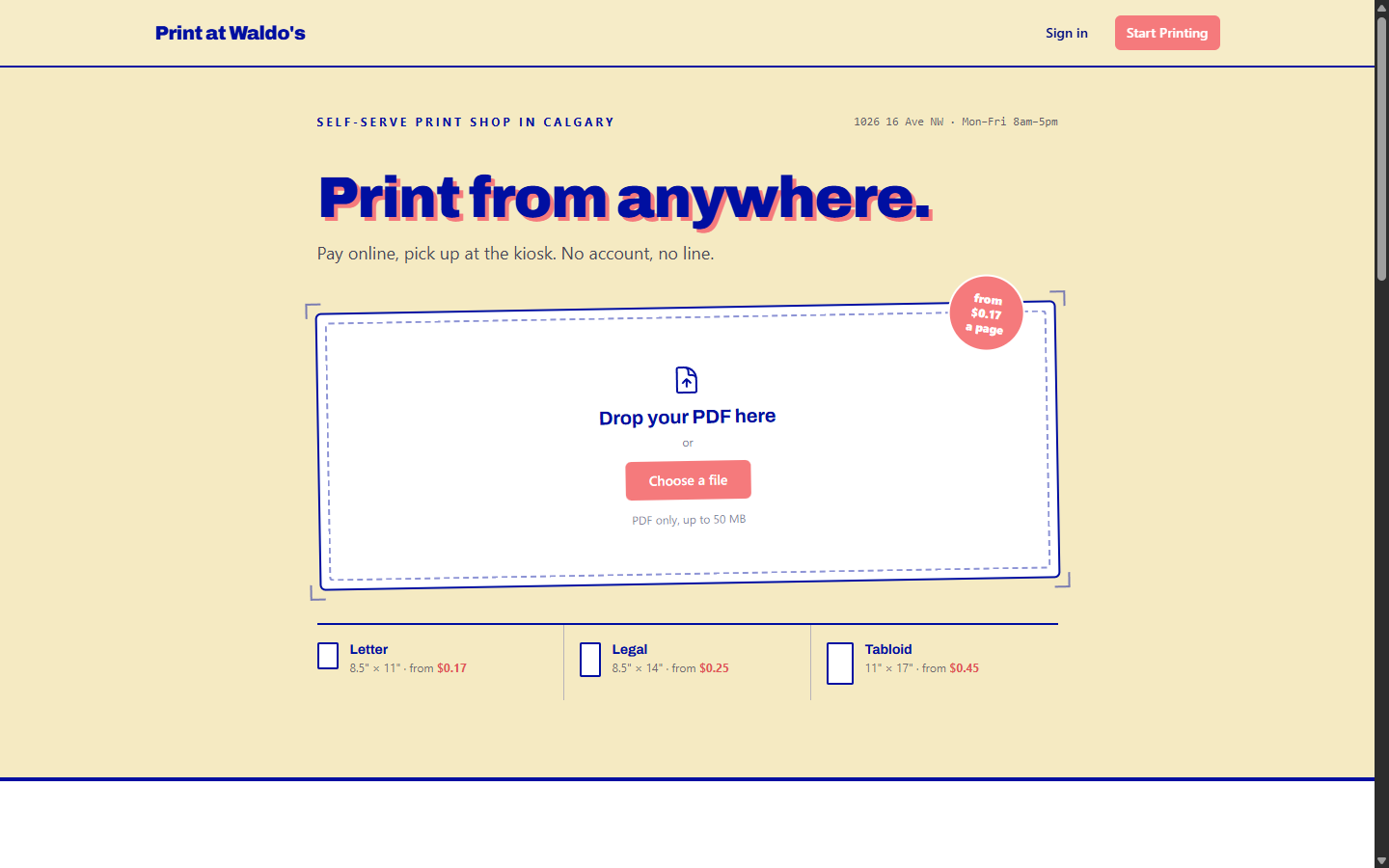
Online ordering system integrated with 5 physical printers across multiple locations. Real-time queue management, automated job routing, and comprehensive admin controls.

The Challenge

Waldo's Imaging operates printing kiosks in multiple Calgary-area locations—think self-service printing stations in libraries, community centers, and other public spaces. Customers need to print documents, but the existing process was cumbersome and limited.

The original system required customers to physically visit a kiosk to submit print jobs. No remote submission, no advance queuing. Staff had limited visibility into what was happening across locations. Printer issues might go unnoticed until customers complained.

They wanted something better: customers should be able to submit print jobs online from anywhere, have jobs automatically route to their chosen location, and pick up their prints when ready. Staff should have real-time visibility into all printers and queues.

The unique challenge: This wasn't just a website—it was connecting the digital world to physical hardware. Online orders needed to actually print on specific physical machines in specific physical locations.

This required custom software that could communicate with printers, route jobs correctly, monitor status, and handle the edge cases that inevitably arise when hardware is involved.

What We Built

Key features of the Print at Waldo's system.

Online file upload and ordering
Multi-location support
Automated job routing
Printer hardware integration
Real-time queue monitoring
Print status notifications
Payment processing
Admin dashboard
Printer status monitoring
Error handling and alerts
Usage analytics
Mobile-responsive interface

Technical Scope

How we built this hardware-integrated platform.

01

Online Ordering Interface

Customer-facing system for uploading documents and submitting print orders.

Upload files, select print options (color, sizing, quantity), choose pickup location, and pay—all online before visiting the kiosk.

02

Location-Based Routing

Automatic routing of print jobs to the correct physical printer based on customer selection.

Five printers across multiple locations. System ensures jobs go to the right place automatically.

03

Hardware Integration

Software that communicates directly with physical printers to submit jobs and monitor status.

The bridge between digital orders and physical output. Handles the complexities of printer communication.

04

Queue Management

Real-time tracking of print queues at each location.

Know what's printing, what's waiting, and what's complete. Customers can see queue status before traveling to pickup.

05

Status Monitoring

Continuous monitoring of printer status—paper levels, errors, offline states.

Staff are alerted to problems before customers encounter them. Proactive maintenance rather than reactive troubleshooting.

06

Admin Dashboard

Central control panel for managing all locations, printers, and orders.

Complete visibility across the entire system. Manage pricing, view analytics, handle support issues.

Hardware Adds Complexity

Pure software projects are challenging enough. When you add physical hardware to the mix, complexity increases significantly. Printers can jam, run out of paper, go offline, or encounter errors. Networks can have issues. Physical things break.

We built robust error handling, monitoring, and alerting so problems are caught early and the system degrades gracefully when issues occur.

The Results

What this system achieved for the business.

Remote Job Submission

Customers submit print jobs from anywhere—home, office, phone. No need to stand at a kiosk uploading files.

Reduced Wait Times

Jobs print before customers arrive. Walk in, pick up prints, leave. No waiting for files to upload and print.

Multi-Location Management

Staff manage all printers across all locations from a single dashboard. Visibility and control without traveling to each site.

Proactive Problem Detection

Printer issues are detected and alerted before customers encounter them. Less frustration, better service.

Scalable Operations

Adding new printers or locations is straightforward. The system was built to grow with the business.

Data and Analytics

Usage patterns, peak times, popular locations—data that helps optimize operations and plan expansion.

Project Details

Client: Waldo's Imaging / Print at Waldo's

Industry: Printing Services

Project Type: Custom Platform + Hardware Integration

Live Site: printatwaldos.com

This project demonstrates what's possible when you need to connect web systems to physical hardware. It's not something every business needs, but for those that do, custom development is often the only path.

The system continues to operate and evolve as the business expands to new locations and adds capabilities.

Project FAQ

Questions about this project.

Custom software running at each location handles communication with the printer hardware. It receives jobs from the central system, submits them to the printer, and reports status back.

Have a question that's not answered here?

Call us at (403) 829-1452

Need Hardware Integration?

If your business needs to connect web systems to physical devices, let's discuss what's possible.

linkedin icon
instagram icon
facebook icon